> ## Documentation Index
> Fetch the complete documentation index at: https://docs.fastapps.org/llms.txt
> Use this file to discover all available pages before exploring further.
# How ChatGPT apps work
> Understand how ChatGPT apps work, and how to build one with FastApps
 ## How ChatGPT apps work
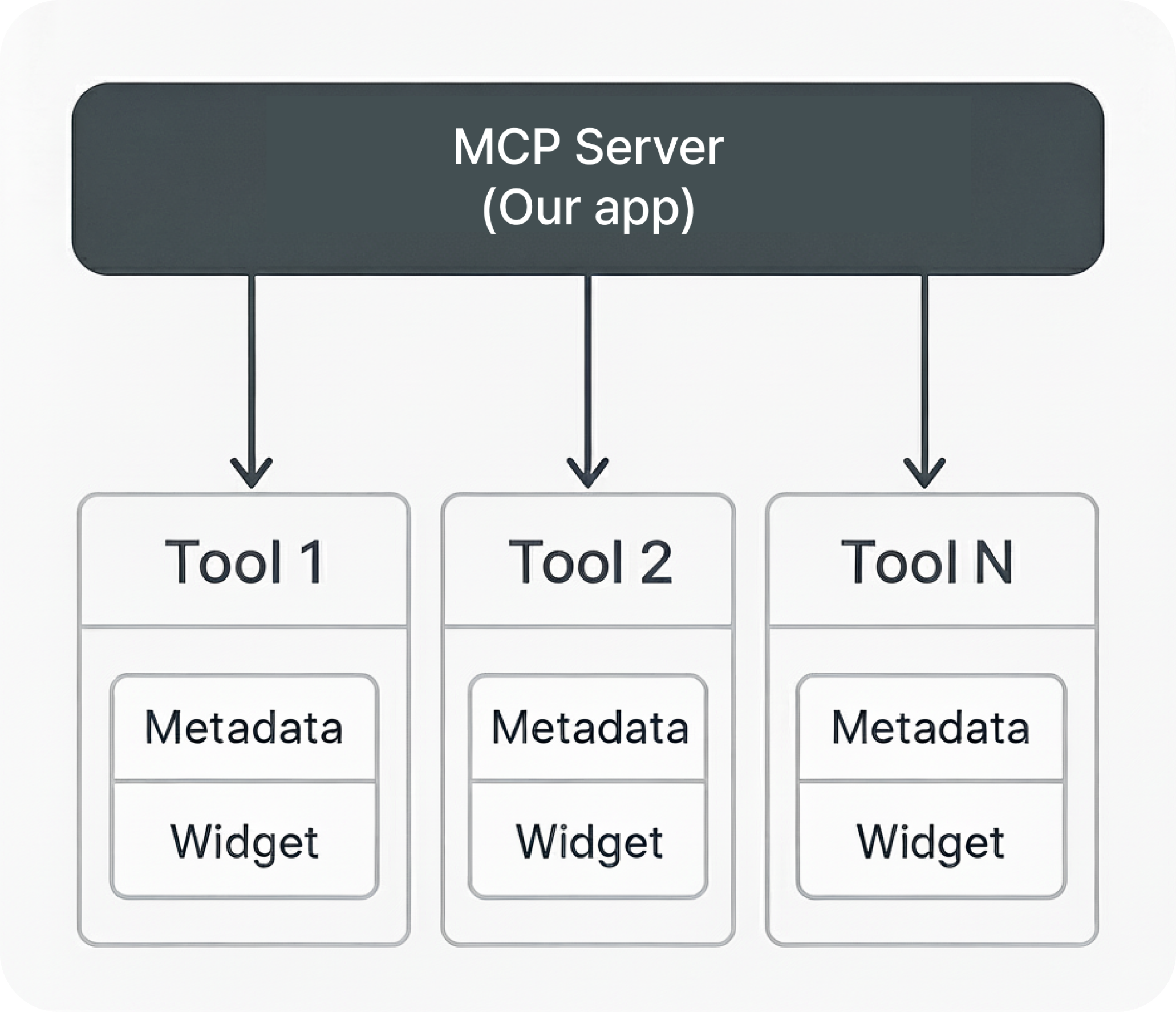
At its core, a ChatGPT app is an MCP server that exposes multiple tools. Each tools return structured contents including a widget.
Specifically, each tools include
* Metadata : Description of the tool (so that the model could call the right tool at the right time), input schema, the message to be displayed before/after the tool is executed, etc.
* Widgets : This is the component that is being displayed on the screen.
## Building ChatGPT apps
With FastApps, you could simply use the prebuilt library to resgister tools and widgets.
**Tools** (`server/tools/hello_tool.py`)
```python theme={null}
from fastapps import BaseWidget, ConfigDict
from pydantic import BaseModel
from typing import Dict, Any
class MyWidgetInput(BaseModel):
model_config = ConfigDict(populate_by_name=True)
class MyWidgetTool(BaseWidget):
identifier = "hello"
title = "My Widget"
input_schema = MyWidgetInput
invoking = "Loading widget..."
invoked = "Widget ready!"
widget_csp = {
"connect_domains": [],
"resource_domains": []
}
async def execute(self, input_data: MyWidgetInput, context=None, user=None) -> Dict[str, Any]:
return {
"message": "Welcome to FastApps"
}
```
**Widgets** (`widgets/hello/index.jsx`)
```jsx theme={null}
import React from 'react';
export default function HelloWidget() {
return (
## How ChatGPT apps work
At its core, a ChatGPT app is an MCP server that exposes multiple tools. Each tools return structured contents including a widget.
Specifically, each tools include
* Metadata : Description of the tool (so that the model could call the right tool at the right time), input schema, the message to be displayed before/after the tool is executed, etc.
* Widgets : This is the component that is being displayed on the screen.
## Building ChatGPT apps
With FastApps, you could simply use the prebuilt library to resgister tools and widgets.
**Tools** (`server/tools/hello_tool.py`)
```python theme={null}
from fastapps import BaseWidget, ConfigDict
from pydantic import BaseModel
from typing import Dict, Any
class MyWidgetInput(BaseModel):
model_config = ConfigDict(populate_by_name=True)
class MyWidgetTool(BaseWidget):
identifier = "hello"
title = "My Widget"
input_schema = MyWidgetInput
invoking = "Loading widget..."
invoked = "Widget ready!"
widget_csp = {
"connect_domains": [],
"resource_domains": []
}
async def execute(self, input_data: MyWidgetInput, context=None, user=None) -> Dict[str, Any]:
return {
"message": "Welcome to FastApps"
}
```
**Widgets** (`widgets/hello/index.jsx`)
```jsx theme={null}
import React from 'react';
export default function HelloWidget() {
return (
Hello world!
);
}
```
## What FastApps provide
FastApps provide everything you need to build sophisticated ChatGPT apps:
**Widget Registration**: Use the `BaseWidget` class to simply register it as an MCP tool. We handle the rest - no complex configuration or manual registration needed.
**CLI commands**: Just type `fastapps init` to set up the whole project. Use `fastapps create mywidget` to make an widget. Everything from component creation to MCP tool registeration will be set up automatically.
**Simple auth**: Authentication and other advanced features are all handled with our simple decorators. Just add `@auth_required` and you're done.
## Next Steps
Get up and running with FastApps in minutes